Paying in Thailand as a Foreigner (2026): Why PromptPay QR Won't Work, ATM Fees, and What Does
PromptPay QR is everywhere in Thailand and mostly closed to foreign cards — here's where cards actually work, what Thai ATMs really charge, and how much cash to carry.

**Quick summary — 3-minute read**
• PromptPay QR codes are everywhere — street stalls, night markets, cafés — but the system was built for Thai bank account holders, so most foreign banking apps simply can't scan and pay them.
• Thai ATMs charge roughly 220 THB (about US$6) per withdrawal on top of whatever your own bank charges, so fewer, larger withdrawals beat frequent small ones.
• Cards generally work at malls, chain stores, and hotels; street food, small shops, and some taxis are cash-only in practice.
• Official foreigner-friendly alternatives exist (TAGTHAi Easy Pay, TouristDigiPay) but awareness and adoption are still low — treat them as a backup, not a default.
• A photo of a QR sign or payment notice tells you in plain English whether it's something you can actually pay, before you're standing at the counter finding out the hard way.
Walk through almost any market, café, or 7-Eleven in Thailand and you'll see the same small QR code taped to the counter — PromptPay, the national instant-payment system that's become the default way Thais pay for nearly everything. It looks like it should work for anyone with a smartphone. For most foreign visitors, it doesn't, and the reason is a policy detail that rarely makes it into travel guides.
This guide explains why PromptPay is mostly closed to foreign cards, what a Thai ATM actually costs you per withdrawal, where cards genuinely work versus where you'll need cash, and a practical framework for how much baht to carry depending on your trip style.
None of this is a criticism of the system — PromptPay is, by most measures, one of the more successful instant-payment rollouts anywhere, and it genuinely has replaced cash for most day-to-day transactions among Thai residents. The friction here is specifically a tourist-facing gap: a system built extremely well for its intended users, with limited thought given to the growing number of visitors who see the same QR code everywhere and assume it must work for them too.
Why PromptPay QR won't work for you
PromptPay was designed as a domestic system for people holding Thai bank accounts — it links a Thai mobile number or national ID to a Thai bank account for instant transfers. Most foreign banking and payment apps simply aren't connected to that network, so scanning a PromptPay QR code with a Western banking app typically fails outright rather than charging a fee.
- ASEAN cross-border QR interoperability does exist, but it currently connects neighboring Southeast Asian countries' payment systems to each other — not Western-issued cards or apps.
- This isn't a temporary glitch or a rollout still in progress — it's the system working as designed for a different user base than international tourists.
The 220 THB ATM fee, and why fewer withdrawals win
Thai ATMs charge foreign-issued cards a withdrawal fee of roughly 220 THB (about US$6) per transaction, on top of whatever your own bank charges for a foreign ATM withdrawal or currency conversion. That fee is flat per transaction, not a percentage — which means it hits you exactly as hard whether you withdraw 1,000 baht or 20,000 baht.
- The math favors withdrawing larger amounts less often: three withdrawals of 6,000 baht cost you three 220-baht fees, while one withdrawal of 18,000 baht costs you one.
- Balance this against safety and trip length — carrying a large amount of cash has its own downsides, so this is a trade-off, not a rule to max out on day one.
Where cards actually work vs where they don't
Cards generally work: shopping malls, department stores, chain convenience stores and supermarkets, hotels, and larger restaurants aimed at tourists or a broader local middle-class clientele.
Cards generally don't: street food stalls, night markets, small family-run shops, and many taxis and tuk-tuks — these run on cash or PromptPay, and PromptPay is the part that doesn't work for you as covered above.
- When in doubt in a smaller shop or stall, assume cash until you see a card machine or a sign confirming otherwise — asking upfront avoids an awkward moment after you've already ordered.
The "no foreign transaction fee" card reality check
A travel credit or debit card advertised as having no foreign transaction fee removes one layer of cost, but it doesn't make Thai ATM withdrawals free. That 220 THB fee is charged by the Thai bank operating the ATM, not by your home bank — so a zero-foreign-fee card still gets hit by it at the point of withdrawal. The "no fee" claim is accurate for your bank's side of the transaction; it just isn't the whole picture.
- Some ATMs display a "dynamic currency conversion" prompt offering to charge you in your home currency instead of Thai baht — decline this every time, since the exchange rate offered is reliably worse than letting your own bank handle the conversion.
- A handful of digital-first banks reimburse foreign ATM fees as part of their account terms, which can meaningfully offset the 220-baht charge — worth checking your specific account's terms before you travel rather than assuming a "travel-friendly" label covers this.
Airport exchange counters vs ATMs
Currency exchange counters at Suvarnabhumi and other Thai airports are convenient for the first few thousand baht you need right after landing, but their rates are typically weaker than what you'd get from an ATM withdrawal once your own bank's fees are factored in — the convenience carries a real cost. A reasonable approach is exchanging a small amount at the airport just to cover a taxi or train into the city, then relying on ATMs for the bulk of your cash once you've had a chance to compare rates.
Official remedies: TAGTHAi Easy Pay and TouristDigiPay
Thai authorities have rolled out tourist-facing payment options intended to bridge exactly this gap — a prepaid card under the TAGTHAi Easy Pay program, and a QR-based tourist payment system called TouristDigiPay. In principle, both are built so visitors can pay via QR the way locals do, without needing a Thai bank account.
- In practice, awareness of both remains low among travelers, and adoption is still limited — treat them as a useful backup to look into before your trip rather than something you can count on finding set up and ready at every counter.
- If you're the type of traveler who likes to have every option covered in advance, it's worth checking current sign-up requirements before you fly, since procedures and availability can change.
How much cash to carry, by trip style
City-based, hotel-heavy trip: lean more on cards for accommodation and larger restaurants, and carry enough cash for daily street food, markets, and taxis — a few thousand baht refreshed every few days covers most of this style comfortably.
Backpacker / street-food-heavy trip: cash carries more of the load here, since the cheapest, most memorable food and transport in Thailand skews cash-only — plan for larger, less frequent ATM withdrawals to minimize the per-transaction fee.
Mixed itinerary with islands or rural stops: card acceptance thins out noticeably outside major cities, so top up cash before leaving a city with reliable ATMs rather than assuming you'll find one on a smaller island or in a rural town.
Checking a QR code or payment sign before you're stuck
A QR code taped to a counter doesn't tell you which network it belongs to at a glance, and a payment notice in Thai doesn't tell you what it's actually asking for. AI Life Guide, a free assistant inside LINE, lets you photograph the sign or QR code and ask in plain English what it is and whether it's something your card or app can realistically pay.
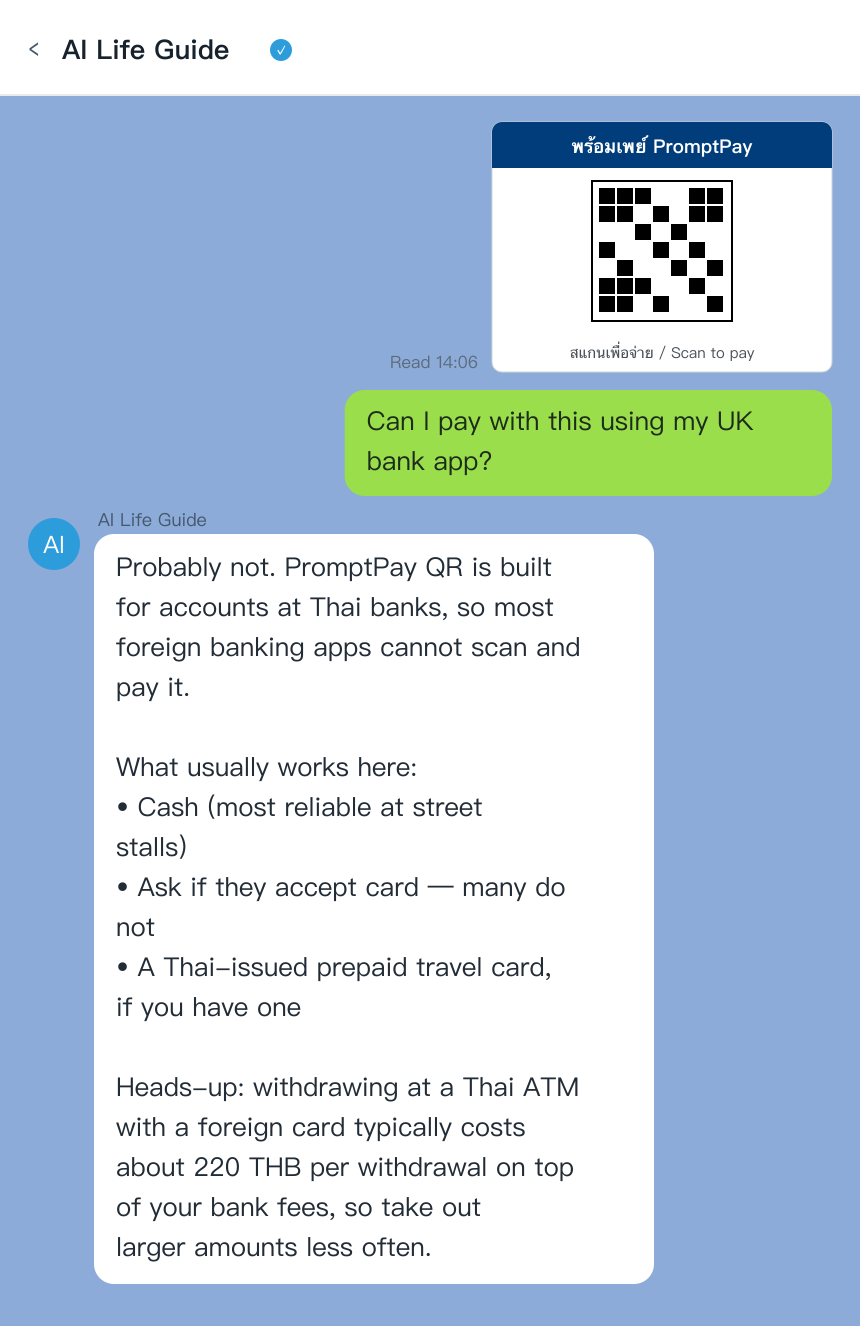
AI Life Guide demo: photograph a PromptPay QR sign or payment notice in LINE and find out whether you can actually pay it (simulated screenshot)
It won't process the payment for you, but it turns an ambiguous sign into a plain-English answer before you're standing at the counter finding out the hard way — worth doing once before you commit to an order you can't easily walk away from.
Honest limits
A photo tells you what a sign or QR code says and generally what payment network it belongs to — it can't guarantee your specific card or banking app will work with it, since that depends on your own bank's partnerships and settings. Treat it as a first screen that narrows down your options, and keep a cash backup for anywhere it turns out cards genuinely won't help.
Not sure if you can pay that QR code? Add AI Life Guide on LINE (free) and photograph the sign before you order.
Payment method quick-reference
- Method: PromptPay QR | Works for tourists?: Rarely | Typical use: Street stalls, markets | Cost: N/A — usually fails to scan
- Method: Thai ATM withdrawal | Works for tourists?: Yes | Typical use: Cash top-up | Cost: ~220 THB/transaction + home bank fees
- Method: Credit/debit card | Works for tourists?: Malls, hotels, chains | Typical use: Larger purchases | Cost: Varies by card
- Method: TAGTHAi Easy Pay / TouristDigiPay | Works for tourists?: In principle, yes | Typical use: QR payments like locals | Cost: Low awareness, treat as backup
FAQ
Q: Can I use PromptPay as a tourist?
A: Generally no. PromptPay was built for holders of Thai bank accounts, and most foreign banking apps aren't connected to that network, so scanning a PromptPay QR with a Western card or app typically fails. Official tourist-facing alternatives like TouristDigiPay exist but have low adoption so far.
Q: How much are Thai ATM fees?
A: Expect roughly 220 THB (about US$6) per withdrawal from a Thai ATM using a foreign card, charged on top of whatever your own bank adds for foreign withdrawals or currency conversion. Because it's a flat fee per transaction, withdrawing larger amounts less often reduces how much of your money goes to fees overall.
Q: Do I need cash in Bangkok?
A: Yes, for at least part of your spending. Cards work reliably at malls, hotels, and chain stores, but street food, markets, and many taxis run on cash or PromptPay — and PromptPay is largely closed to foreign cards, so cash fills that gap.
Q: Will my contactless card work on the BTS?
A: Honestly, no — BTS gates in Bangkok do not currently accept international contactless bank cards the way some other cities' transit systems do. You'll need a Rabbit card or a single-journey ticket instead, and worth knowing upfront: a Rabbit card loaded for the BTS does not carry over to the separate MRT system, so budget cash or a card top-up for whichever line you're not covered on.
Q: What's the cheapest way to get baht?
A: In most cases, withdrawing larger amounts less often from a Thai ATM with a low-fee or no-foreign-transaction-fee card, rather than making frequent small withdrawals or relying on airport currency exchange counters, which typically offer weaker rates. Compare your specific bank's foreign ATM policy before you travel, since it varies significantly by issuer.
Bottom line
PromptPay's ubiquity in Thailand is real, but it's a Thai-bank-account system wearing a QR code that looks universal — it mostly isn't, for foreign visitors. Budget for the roughly 220-baht Thai ATM fee by withdrawing less often in larger amounts, lean on cards where they reliably work, and carry enough cash for the street food and markets that make the trip worth it in the first place.
Planning your cash strategy before you land? Add AI Life Guide on LINE (free) to check any payment sign you run into.
Further reading
- Thailand Tourist Scams 2026: the ones that actually happen
- Dual Pricing in Thailand (2026): how to read the Thai-numeral price
- Thailand Travel Apps to Download (2026)
- Menu Translation Apps for Asia 2026
Sources
- Japan Tourism Agency & Thai tourism authority data, 2024–2026
- US Embassy Thailand advisory
- Traveler forum reports and hands-on testing, 2026