10 Apps to Download Before Your Japan Trip (2026) — And the One Hiding Inside LINE
Navigation, payment, transit, and language apps that actually work in Japan — plus the messaging app most English-speaking travelers skip, and the free tool living inside it.

**Quick summary — 3-minute read**
• Ten apps are worth having on your phone before you land in Japan, covering navigation, payment, language, and food.
• Most are free to download; a few (booking apps, ride-hailing) only cost money once you actually book or ride something.
• Google Maps, a transit app, and Google Translate cover the basics — but the app that quietly does the most on the ground is LINE.
• LINE is Japan's dominant messenger, and it's also where AI Life Guide lives: add one friend, then photograph any menu, sign, or label for an instant plain-English explanation with follow-up questions.
• None of these replace judgment — internet access, screen glare, and blurry photos all still get in the way sometimes.
Every "Japan travel apps" list looks roughly the same: Google Maps, Google Translate, maybe a JR Pass calculator. That's a fine starting point, but it skips the app most English-speaking travelers already have installed for something else entirely — and don't realize is quietly one of the most useful things on their phone once they land.
This list is organized the way you'll actually use these apps on the ground: getting around, paying for things, understanding what's written in front of you, and finding food. Ten apps, in the order it's worth installing them, ending with the one that surprises most first-time visitors.
1. Google Maps
What it does: Turn-by-turn walking and transit directions, train platform numbers, and business hours for restaurants and shops across Japan.
Why you need it: It's the closest thing to a universal default for getting around Japanese cities, and it's generally reliable for walking directions and basic train routing.
- Download offline maps for the specific cities and regions you're visiting before you land — walking directions and GPS still work without signal, though live transit data won't.
- Don't assume every rural bus route or small-town business-hour listing is accurate — coverage thins out noticeably outside major cities.
Cost: Free.
2. Suica in Apple Wallet or Google Pay
What it does: Lets you tap your phone at train, subway, and bus gates instead of buying paper tickets, and doubles as contactless payment at many convenience stores and vending machines.
Why you need it: Skipping the ticket-machine queue on your first jet-lagged morning in Tokyo is worth the five minutes of setup on its own.
- iPhone users can add Suica directly in the Wallet app before leaving home; Android users generally need a compatible device and the Suica or Google Pay app.
- Top-up ("charging") can usually be done from your phone with a credit card, though card compatibility varies by issuer — worth testing before you travel if you can.
Cost: Free to set up; you load your own money onto the card as you go.
3. Japan Transit Planner or NAVITIME Japan Travel
What it does: Japan-specific route planning that factors in JR Pass coverage, shows which train car to board for the fastest transfer, and covers regional and local lines Google Maps sometimes misses.
Why you need it: If you're using a JR Pass or doing heavy inter-city train travel, a Japan-specific planner is noticeably better at surfacing pass-covered routes than a general-purpose maps app.
- Useful as a second opinion when Google Maps and a local transit app disagree on a route or transfer.
- Interface is more information-dense than Google Maps, which some travelers find harder to scan quickly at a glance.
Cost: Free, with some apps offering paid tiers for extra features.
4. Google Translate (with the offline pack)
What it does: Camera-based translation, text translation, and conversation mode, with a downloadable Japanese language pack for offline use.
Why you need it: It's the most reliable no-signal backup you can carry, and it covers far more than Japanese if your trip continues elsewhere in Asia.
- Download the Japanese offline pack before you leave home, not after you land — you'll usually want it exactly when you have no signal.
- Camera translation on menus and handwritten signs is hit-or-miss; treat it as a first pass, not a final answer.
Cost: Free.
5. Google Lens
What it does: Point your camera at text, a product, or a landmark, and it translates or identifies what you're looking at.
Why you need it: Genuinely handy for identifying unfamiliar packaged snacks or skincare on a convenience-store shelf, beyond just translating the label.
- Shares the same literal-translation limits as Google Translate's camera mode on menus and signage.
- Sometimes returns generic web search results instead of a clean answer, which can be more confusing than helpful.
Cost: Free.
6. A booking app — Klook or similar
What it does: Books tickets for attractions, day tours, pocket WiFi or eSIMs, and some transport passes ahead of time.
Why you need it: Popular attractions and day tours increasingly sell out or require timed-entry booking, and having reservations queued up before you land saves scrambling once you're jet-lagged.
- Compare prices against the attraction's own official site before booking — third-party booking apps aren't always cheaper.
- Keep confirmation screenshots saved offline in case you lose signal right at the entrance gate.
Cost: Free to download; you pay only for what you actually book.
7. A taxi app — GO
What it does: Hails a licensed taxi to your location, with fare estimates shown up front and English-language support built into the app.
Why you need it: Late at night or with heavy luggage, GO is a genuinely useful backup to trains — it's one of the most widely used taxi-hailing apps in Japan and works across most major cities.
- Ride-hailing services like Uber operate in a more limited way in Japan than in the US or Europe — GO is generally the more reliable option for a standard metered taxi.
- Fares are metered and can add up quickly over longer distances; it's not a budget alternative to trains for cross-city trips.
Cost: Free to download; you pay standard taxi fare plus any in-app booking fee.
8. Gurunavi or Tabelog
What it does: Restaurant discovery and reviews, with search filters for cuisine, budget, and neighborhood — the local equivalent of a restaurant review site.
Why you need it: Tabelog's review scores are taken seriously by locals in a way international review apps often aren't, and it surfaces small, excellent restaurants that don't show up prominently elsewhere.
- Interface and reviews lean Japanese-first; English support exists but is less polished than the domestic version.
- Some standout restaurants — especially small, counter-seat places — don't take reservations through the app at all; a phone call or walk-in may be your only option.
Cost: Free.
9. Payke
What it does: Scan the barcode on a packaged product — skincare, snacks, over-the-counter medicine — and it pulls product information straight from an official database.
Why you need it: For a drugstore or duty-free haul, it's faster and more reliable than trying to translate a crowded label by hand.
- Only works on barcoded packaged goods — no help with menus, signs, or anything handwritten.
- Needs an internet connection to query the database.
Cost: Free.
10. LINE — and the app hiding inside it
LINE doesn't usually make these lists, because most English-speaking travelers have never needed a messaging app tied to a specific country before. That's a mistake. LINE is Japan's dominant messenger — used for everything from group chats to restaurant reservations and official notifications from hotels and tour operators — and it's free to install regardless of whether you know anyone in Japan to message.
The actual reason it belongs on this list is AI Life Guide, a free assistant that lives inside LINE. Add it as a friend, and any time you're standing in front of something you can't read — a ramen shop's handwritten specials board, a station sign, a drugstore label — you photograph it and ask your question in plain English.
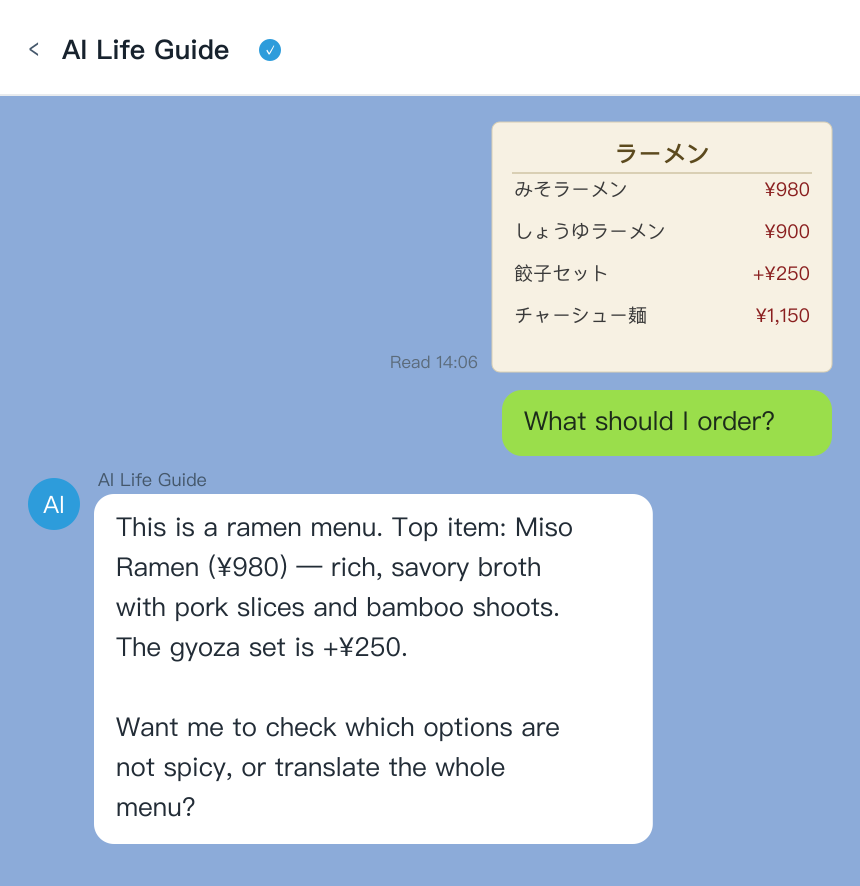
AI Life Guide demo: send a photo of a Japanese ramen menu in LINE and get an instant English explanation (simulated screenshot)
Unlike a straight camera-translation tool, it explains context: not just what the characters say, but what a dish actually is, and you can keep asking — "is this spicy," "does this have shellfish," "what's the dosage on this." That follow-up conversation is the part a one-shot translation app can't do, and it works the same way for a confusing platform sign as it does for a menu.
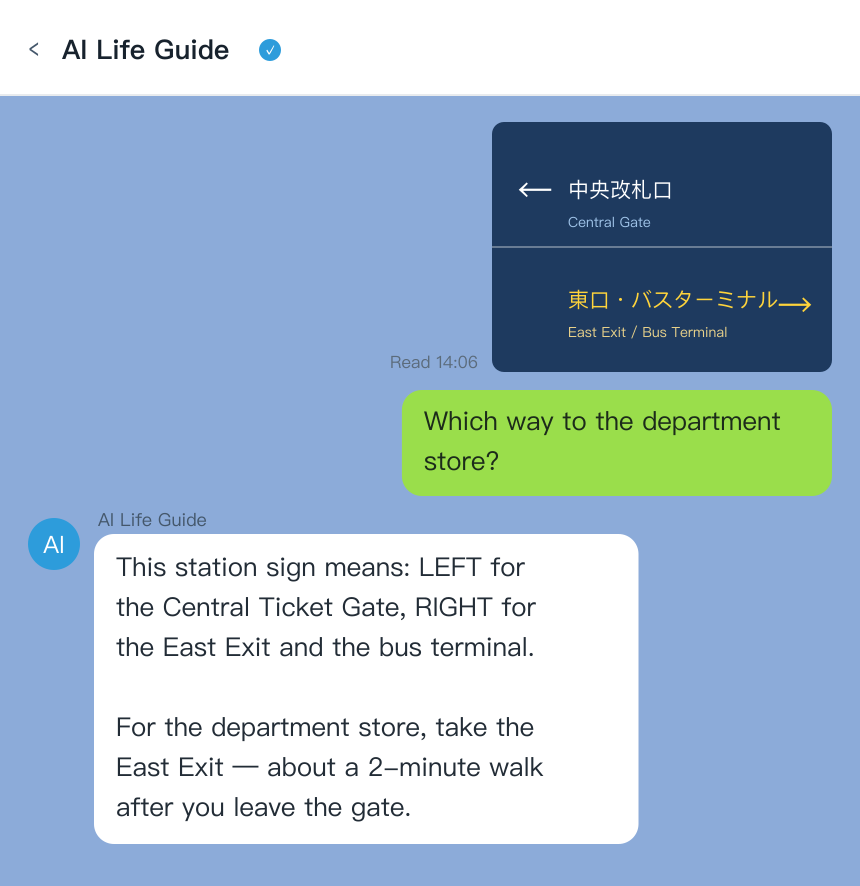
AI Life Guide demo: snap a Japanese station sign and get directions in plain English (simulated screenshot)
Honest cons:
- Needs an active internet connection — no offline mode, so pick up a local eSIM or pocket WiFi if you'll be relying on it away from hotel WiFi.
- It replies in a chat thread, not as a live camera overlay — you take a photo and send it, rather than seeing a translation appear over the image in real time.
- Requires installing LINE, which is one more app than travelers who've never visited Japan or Taiwan are used to carrying.
Cost: Free.
Already downloading apps for the trip? Add AI Life Guide on LINE (free) now, so it's ready the moment you land.
At a glance
- App: Google Maps | Category: Navigation | Offline: Partial | Cost: Free
- App: Suica (Wallet/Pay) | Category: Payment | Offline: N/A | Cost: Free to set up
- App: NAVITIME Japan Travel | Category: Transit planning | Offline: Limited | Cost: Free, paid tiers
- App: Google Translate | Category: Language | Offline: Yes (pack) | Cost: Free
- App: Google Lens | Category: Language / ID | Offline: No | Cost: Free
- App: Klook | Category: Booking | Offline: No | Cost: Free, pay per booking
- App: GO | Category: Taxi | Offline: No | Cost: Free, pay per ride
- App: Tabelog | Category: Restaurants | Offline: No | Cost: Free
- App: Payke | Category: Barcode scan | Offline: No | Cost: Free
- App: LINE + AI Life Guide | Category: Messaging + language | Offline: No | Cost: Free
FAQ
Q: Do I need a Japan eSIM for these apps to work?
A: Most of these apps — LINE, AI Life Guide, Google Lens, GO, Payke — need a live internet connection to work, so yes, an eSIM or a pocket WiFi rental is worth arranging before you land. A handful (Google Maps offline areas, Google Translate's downloaded language pack) work without any connection at all, but they're the exception, not the rule.
Q: Which apps work offline in Japan?
A: Google Maps works offline for GPS-based walking directions once you've pre-downloaded the relevant area, and Google Translate works offline once you've downloaded the Japanese language pack. Everything else on this list — transit planners, LINE, Google Lens, booking and taxi apps — needs a live connection to function.
Q: Is LINE necessary for tourists in Japan?
A: Not strictly necessary, but it's a low-cost addition that pays off. It's free, takes about a minute to set up, and you'll likely see it referenced by hotels, restaurants, and tour operators anyway. The main reason to install it is AI Life Guide, which turns your camera into a conversational translator for anything you can't read.
Q: How do I read Japanese menus without speaking Japanese?
A: Photograph the menu and send it to AI Life Guide on LINE, then ask follow-up questions like "is this spicy" or "does this have peanuts." Google Translate's camera mode works as a free offline backup, though it translates literally and won't explain what a dish actually is the way a conversational tool can.
Q: Are these apps free?
A: Most of them are fully free — Google Maps, Google Translate, Google Lens, Tabelog, Payke, LINE, and AI Life Guide cost nothing to download or use. NAVITIME offers a free tier with optional paid upgrades. Klook and GO are free to install; you only pay when you actually book a tour or take a ride.
Bottom line
Nine of these apps solve problems you can predict before you leave home: getting around, paying at a gate, finding a restaurant. The tenth — LINE, specifically for AI Life Guide — solves the problem you can't predict: the exact menu, sign, or label you're stuck in front of at 9pm with no idea what it says. Install it alongside the rest, not instead of them.
Set your phone up right before you land — add AI Life Guide on LINE (free) and photograph your first menu the day you arrive.
Further reading
- Best Japan Travel Translation Apps 2026: 6 Tools Tested for Menus, Signs & Pharmacies
- Getting Around Asia 2026: Transit Apps, IC Cards & How to Read Ticket Machines
- Menu Translation Apps for Asia 2026: Order Confidently in Japan, Korea, Thailand & Taiwan
- How to read a Japanese menu — the full walkthrough
- Is LINE worth downloading for a Japan trip? 6 real uses
- Cash or card in Japan: where you still need yen
- Getting sick in Japan: buying the right medicine at a drugstore
- Reading Japanese station signs and ticket machines (2026)
- Japan drugstore shopping: reading labels and knowing what you're buying
Sources
- Official app/tourism documentation, 2025-2026
- Hands-on travel testing, 2026