10 Apps to Download Before Your Thailand Trip (2026) — Grab, LINE, and the AI That Reads Thai for You
The 10 apps every English-speaking traveler needs for Thailand in 2026 — Grab, Google Maps, LINE, and the AI living inside LINE that reads Thai menus and signs for you, with honest notes on what's actually free.
**TL;DR**
• 10 apps worth downloading before landing in Thailand, ranked by what they actually do — not marketing copy
• Grab and Google Maps cover getting around; LINE is Thailand's #1 messenger and businesses use it constantly
• The real unlock: AI Life Guide lives inside LINE and reads Thai menus, signs, and labels for you, in plain English, with follow-up questions
• Google Translate's offline Thai pack is a solid backup, but Thai script is genuinely hard for OCR — expect some misreads
• A day pass for AI Life Guide costs about the same as one night-market snack, and covers one full night-market crawl
Thailand is one of the most rewarding countries to travel independently — the food, the transport, the sheer density of things to see. It's also a country where the script is completely unfamiliar to most English speakers, Grab pricing can surprise first-timers, and "is this app free or not" is a question worth answering honestly before you land, not after you've already paid for something you didn't need.
This roundup covers 10 apps worth having on your phone before a Thailand trip in 2026. Each entry says plainly what the app does, why it's useful, and whether it's actually free — no invented pricing, no exaggerated claims. A few of these you'll use daily; a few are situational. Read the whole list once before you go so you know which ones to set up in advance (some need a local number or a download over Wi-Fi).
1. Grab
Grab is the dominant ride-hailing and food-delivery app across Southeast Asia, and Thailand is no exception. Book a car, a motorbike taxi, or food delivery from the same app. The main appeal for travelers is that the fare is shown upfront before you confirm — no haggling, no language barrier with the driver about the destination since it's typed into the app. Grab is free to download and use; you only pay for the rides and orders you place. Good to have set up before you land, since account verification can take a few minutes.
2. Google Maps
Google Maps works well in Thailand for walking and driving directions, and it's essential for understanding Bangkok traffic reality — a 5km trip can take 10 minutes or 50 minutes depending on the hour, and Maps' live traffic layer is usually a fair predictor. Transit directions for the BTS Skytrain and MRT subway are generally reliable in Bangkok, though smaller cities have thinner public transit data. Free, and the offline map download (save an area for offline use) is worth doing before a trip to islands or rural areas with patchy signal.
3. LINE — Thailand's #1 messenger
LINE is Thailand's #1 messaging app, and this matters more for travelers than it might first appear. Many guesthouses, tour operators, restaurants, and even some government services communicate through LINE rather than email or WhatsApp — a hotel confirming your booking, a tour company sending pickup details, a friend-of-a-friend sharing recommendations. If you show up without LINE installed, you'll find yourself asking people to switch to a platform they don't really use.
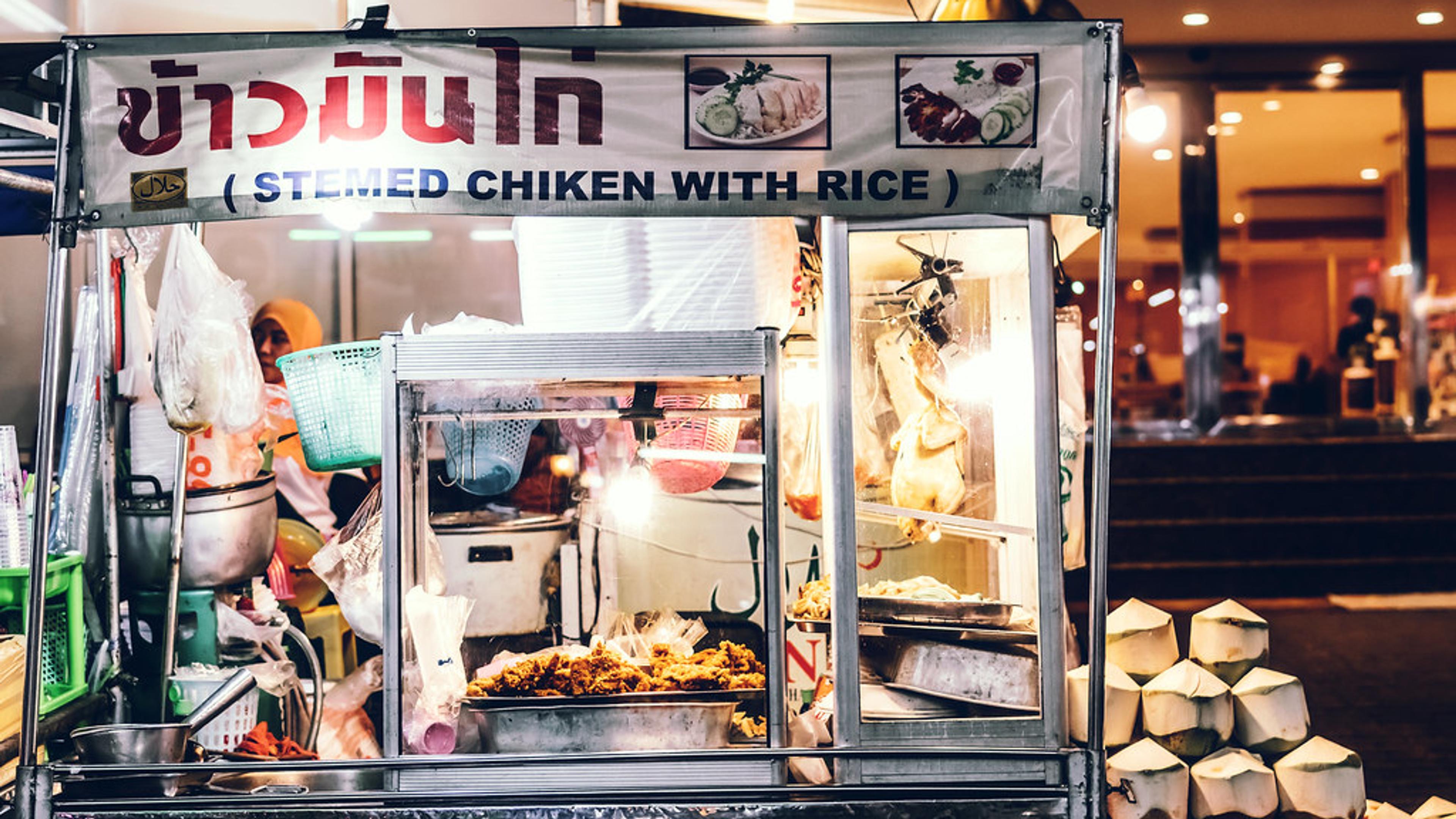
But the bigger reason LINE matters for this list is what lives inside it: AI Life Guide, an AI assistant built into LINE that you can add as a friend and use immediately — no separate app download, no new account. Point your camera at a Thai menu, a street sign, a medicine label, or a laundry instruction card, send the photo into the chat, and it explains what it says in plain English. You can then ask follow-up questions in the same conversation — "does this dish have pork?", "is this spicy?", "what's the dosage on this?" — instead of re-scanning the same object with a translation app that gives you one flat answer and stops there. LINE itself is free; AI Life Guide inside it has a free daily tier plus paid tiers for heavier use (covered below).
4. Google Translate
Google Translate remains a solid general-purpose tool, and downloading the offline Thai language pack before you leave (over Wi-Fi, since it's a sizeable download) is worth doing as a backup for when you have no signal. Being honest about its limits: Thai script has no spaces between words and stacked tone marks and vowels above/below consonants, which makes camera-mode OCR noticeably less reliable for Thai than for languages with clearer character separation — you'll sometimes get garbled or partial translations on handwritten menus or low-contrast signage. It's a good free safety net, not a primary tool for anything nuanced.
5. Klook / 12Go
For booking activities, day tours, and transport tickets — trains, buses, ferries between islands — apps like Klook and 12Go are the standard way most travelers handle logistics in Thailand. They're free to download; you pay per booking, and prices are generally transparent before you confirm. Useful for pre-booking popular routes (like ferries to Koh Phi Phi or Koh Samui) during high season when walk-up tickets can sell out.
6. An eSIM app (Airalo-style)
Rather than hunting for a physical SIM card at the airport, an eSIM app lets you buy a Thailand data plan before you land and activate it the moment you touch down — genuinely useful for getting Grab and Google Maps working from the airport onward. Pricing varies by provider and data allowance, so compare a couple of options in-app rather than assuming one is cheapest; a physical SIM from an airport kiosk is still usually the better deal if you're staying more than a couple of weeks.
7. FoodPanda
FoodPanda is a secondary food delivery option alongside Grab, and it's worth having as a backup — coverage and restaurant selection differ block by block, so if a restaurant you want isn't on one app, it's often on the other. Free to download, pay per order plus delivery fee.
8. A currency converter (XE or similar)
A simple currency converter app — XE is the most widely used — earns its place on your phone for quick mental-math checks when a price is quoted in Thai baht and you want a fast sanity check before paying. Free, works offline once rates are cached from your last connection, though rates won't update without a connection.
9. BTS/MRT transit apps
Bangkok's BTS Skytrain and MRT subway each have official apps (and several third-party ones) with route maps, fare calculators, and station exits — genuinely helpful in Bangkok's larger interchange stations like Siam or Asok, where picking the wrong exit can add a 10-minute walk. Free to download; you still pay for fares at the station via card or the Rabbit card system.
10. A weather / air-quality app
Worth having for a factual reason: northern Thailand — Chiang Mai, Chiang Rai, and surrounding provinces — experiences a seasonal burning period (roughly February through April) when agricultural burning pushes PM2.5 air quality readings well above healthy levels for days or weeks at a time. A weather app with an air-quality index (many general weather apps now include this, or use a dedicated AQI app) lets you check before committing to outdoor plans in that region during those months. Free, and worth checking a few days ahead if your trip includes northern Thailand in that window.
The LINE + AI Life Guide combo
The practical case for this combo: you're already going to install LINE for booking confirmations and local communication, so the AI Life Guide add-on costs you nothing in setup time. Where it earns its keep is the situations Google Translate handles poorly — a handwritten specials board at a local restaurant, a medicine label at a pharmacy when you don't know the Thai word for what you need, a laundry symbol chart at your guesthouse. A single day pass (about $1.49) covers roughly one evening out — say, one full night-market crawl where you're photographing five or six different food stalls and asking follow-up questions about each one — which is a reasonable way to try it before committing to a monthly plan.
🎯 Can't read a Thai menu or street sign? Snap a photo and send it to AI Life Guide on LINE (free to add) for a plain-English explanation, with follow-up questions welcome.
Summary table
- App: Grab | Category: Rides + food delivery | Offline: No | Cost: Free, pay per ride/order
- App: Google Maps | Category: Navigation | Offline: Partial (saved maps) | Cost: Free
- App: LINE + AI Life Guide | Category: Messaging + AI translation | Offline: No | Cost: Free tier; $3.99/mo, $34.99/yr, or $1.49 day pass
- App: Google Translate | Category: Language | Offline: Yes (Thai pack) | Cost: Free
- App: Klook / 12Go | Category: Bookings / transport | Offline: No | Cost: Free, pay per booking
- App: eSIM app | Category: Connectivity | Offline: N/A | Cost: Varies by data plan
- App: FoodPanda | Category: Food delivery | Offline: No | Cost: Free, pay per order
- App: XE Currency | Category: Currency conversion | Offline: Cached rates only | Cost: Free
- App: BTS/MRT transit app | Category: Transit planning | Offline: Limited | Cost: Free
- App: Weather/AQI app | Category: Air quality + weather | Offline: No | Cost: Free
FAQ
Q: Do I need Grab, or is hailing a taxi on the street fine?
A: Both work, honestly. Metered taxis in Bangkok are generally reliable if the driver uses the meter (some tourist-area drivers will try to negotiate a flat fare instead — asking for the meter usually resolves this). Grab is more predictable because the fare is locked in before you ride and there's no language barrier over the destination, which matters more outside Bangkok or late at night. Many travelers use both: street taxis for short, familiar routes, Grab for anything longer or in an unfamiliar area.
Q: Does LINE actually work well in Thailand?
A: Yes — LINE has strong network coverage across Thailand's cellular carriers and is used by a large share of the population for both personal and business messaging. Signing up just needs a phone number (a Thai SIM or eSIM makes verification smoother, though it's possible with a foreign number too). Once set up, it works over any Wi-Fi or mobile data connection, same as any messaging app.
Q: How do I actually read a Thai menu with no English on it?
A: Photograph the menu and send it to AI Life Guide inside LINE — it reads the Thai text and explains each dish in plain English, and you can ask follow-ups like "is this spicy" or "does this have shellfish" in the same chat. Google Translate's camera mode is a free alternative, though expect it to struggle more with handwritten or low-contrast menus, since Thai script's lack of spacing and layered tone marks make OCR harder than for many other languages.
Q: Is Google Translate good enough for Thai, or do I need something else?
A: It's a fine free baseline and worth having as a backup, especially with the offline pack downloaded. Where it falls short is nuance and follow-up: it gives you one flat translation and stops, and accuracy drops noticeably on handwritten signs or stylized restaurant menus. For situations where you actually want to understand what you're looking at — a medicine label, an ingredient list, a dish you're unsure about — a tool that lets you ask a follow-up question, like AI Life Guide in LINE, tends to be more useful than a straight translation.
Q: Which of these apps work without an internet connection?
A: Google Maps (if you've saved the area offline beforehand) and Google Translate (if you've downloaded the Thai language pack) are the two that work fully offline. XE Currency will show your last-cached exchange rate without a connection, though it won't update. Everything else on this list — Grab, LINE, Klook/12Go, FoodPanda, transit apps, weather/AQI apps — needs an active data or Wi-Fi connection to function, so having an eSIM or local SIM sorted from day one matters more than people expect.
Bottom line
You don't need all 10 of these running constantly — Grab and Google Maps handle getting around, LINE keeps you connected to bookings and the AI Life Guide translation tool for menus and signs, and the rest are situational (an eSIM before you land, a currency converter for quick checks, an AQI app if you're heading north in burning season). Set up LINE and add AI Life Guide before you go — it costs nothing to try, and the day pass is cheap enough to test on your first confusing menu.
✨ Land in Thailand ready to read every menu and sign. Add AI Life Guide on LINE now
Further reading
- 10 apps to download before your Thailand trip
- 10 Apps to Download Before Your Japan Trip (2026)
- Thailand travel apps: Grab, LINE and the AI that reads Thai
- Thailand Tourist Scams 2026: the ones that actually happen
- Paying in Thailand as a foreigner: PromptPay, ATM fees, and what works
- Handling the language gap in rural Thailand
- Bangkok BTS vs MRT 2026: why one card doesn't work on both
Sources
- Official app documentation and pricing pages for the apps referenced (Grab, Google Maps, LINE, Google Translate, Klook, 12Go, FoodPanda, XE), 2025-2026
- Hands-on testing of real Thailand travel scenarios, July 2026
- Prices as of July 2026 and subject to change — verify current pricing in-app before purchasing