How to Read a Japanese Menu in 2026: Ticket Machines, Handwritten Boards, and What Google Translate Gets Wrong
A practical guide to ordering food in Japan without speaking Japanese — the vending-machine ramen shops, the handwritten izakaya boards, and why camera translation keeps mangling both.
**Quick summary — 3-minute read**
• Most Japanese menus fall into three types: ticket machines, handwritten boards, and photo-less kanji lists — each needs a different approach.
• A small glossary of about 15 recurring characters (定食, 丼, 麺, 焼き, and similar) unlocks a surprising amount of any menu on sight.
• Ticket machines are often cash-only, and the top-left button is usually the house special or most popular pick.
• Camera-translation apps read characters, not meaning — they're built for literal word-mapping, and handwritten cursive kanji trips them up especially hard.
• AI Life Guide on LINE reads the whole photo for context and explains what a dish actually is, then takes follow-up questions like "is this spicy" — free for 5 messages a day, or a $1.49 day pass if you're ordering all night.
Every Japanese menu you'll face on a trip is really one of three bosses. The first is the ticket machine standing at the entrance of a ramen or gyudon shop, rows of unlabeled buttons daring you to guess. The second is the handwritten board at an izakaya, chalk or paper strips in cursive kanji that don't match anything a dictionary app has ever shown you. The third is the plain kanji list — no pictures, no plastic food models, just columns of characters at a neighborhood spot that's never needed an English menu because it's never had a reason to make one.
None of these are solved by memorizing Japanese. They're solved by knowing what to look for, what tool to reach for, and — honestly — what not to expect from the translation app you already have installed. This guide walks through all three, plus the handful of menu vocabulary that quietly does most of the work.
Menu vocabulary that unlocks 80% of any menu
You don't need conversational Japanese to order well. A short list of recurring characters shows up on nearly every menu in the country, and recognizing them on sight tells you the shape of a dish before you've translated a single full sentence.
- 定食 (teishoku): a set meal — usually a main dish plus rice, miso soup, and pickles. The safest, most complete order on almost any menu.
- 丼 (donburi / -don): a rice bowl topped with something — gyudon (beef), katsudon (pork cutlet), oyakodon (chicken and egg).
- 麺 (men): noodles in general — pairs with ラーメン (ramen), うどん (udon), そば (soba).
- 焼き (yaki): grilled or pan-fried — yakitori (grilled skewers), yakisoba (fried noodles), okonomiyaki.
- 揚げ (age): deep-fried — karaage (fried chicken), tempura-adjacent terms often use this too.
- 煮 (ni): simmered — nikujaga (simmered meat and potato), oden.
- 汁 / スープ (shiru / suupu): soup — miso shiru is miso soup specifically.
- 飯 / ご飯 (meshi / gohan): rice — shows up in combo names like chahan (fried rice).
- 定番 / 人気 (teiban / ninki): standard or popular — a signal this is a safe, well-tested order.
- 大盛り (oomori): large portion, often for a small upcharge.
- 辛い (karai): spicy — worth knowing before you order without asking.
- 甘い (amai): sweet.
- 冷たい / 温かい (tsumetai / atatakai): cold / hot — matters a lot for noodle dishes, which come in both.
- 本日のおすすめ (honjitsu no osusume): "today's recommendation" — almost always worth ordering.
Screenshot this list, or better, keep AI Life Guide open — you can photograph a menu and ask "what does 定食 mean on this one" and get an answer specific to that restaurant, not a generic dictionary definition.
Ticket machines, step by step
The vending-machine ordering system at ramen shops, gyudon chains, and some soba counters looks intimidating for about thirty seconds, then becomes the fastest way to order in the country. Here's the actual sequence.
- Find the machine. It's almost always just inside or right beside the entrance — you order and pay before you sit down, not after.
- Have cash ready. A meaningful number of ticket machines, especially at older or smaller shops, are cash-only. IC transit cards (Suica, Pasmo) and card payment are increasingly accepted, but don't count on it — carry coins and small bills as your default assumption.
- Look top-left first. On most machines, the upper-left button is the house special or best-seller — the shop's way of pointing new customers toward a safe, popular order. It's not a universal rule, but it holds often enough to be a genuinely useful first guess.
- Photograph the machine before you queue. Step aside, take a clear photo of the full button grid, and ask AI Life Guide what each button says and which one looks like the standard order. Working this out before you're holding up a line is far less stressful than doing it under pressure at the front.
- Feed in the bill, press your button, take the ticket, and hand it to staff as you sit down. That's the whole transaction.
If a machine only has text and no photos, that's exactly the situation the photograph-first approach is built for — you're never actually guessing blind once you've asked before stepping up.
Handwritten boards: why OCR fails, and what actually works
The handwritten board — chalk, paper strips, a whiteboard taped to the wall — is the hardest menu type for any camera-translation tool, and it's worth understanding why before you rely on one.
- Cursive kanji: handwriting styles used on izakaya boards are often abbreviated or stylized compared to printed characters, and optical character recognition is trained mostly on clean, printed text.
- Vertical text: many boards are written top-to-bottom, sometimes in multiple columns read right-to-left, which throws off scanning tools built around left-to-right horizontal lines.
- Daily specials with no dictionary entry: some handwritten items are seasonal or shop-specific combinations that won't resolve to a clean, single dictionary translation even when the characters are read correctly.
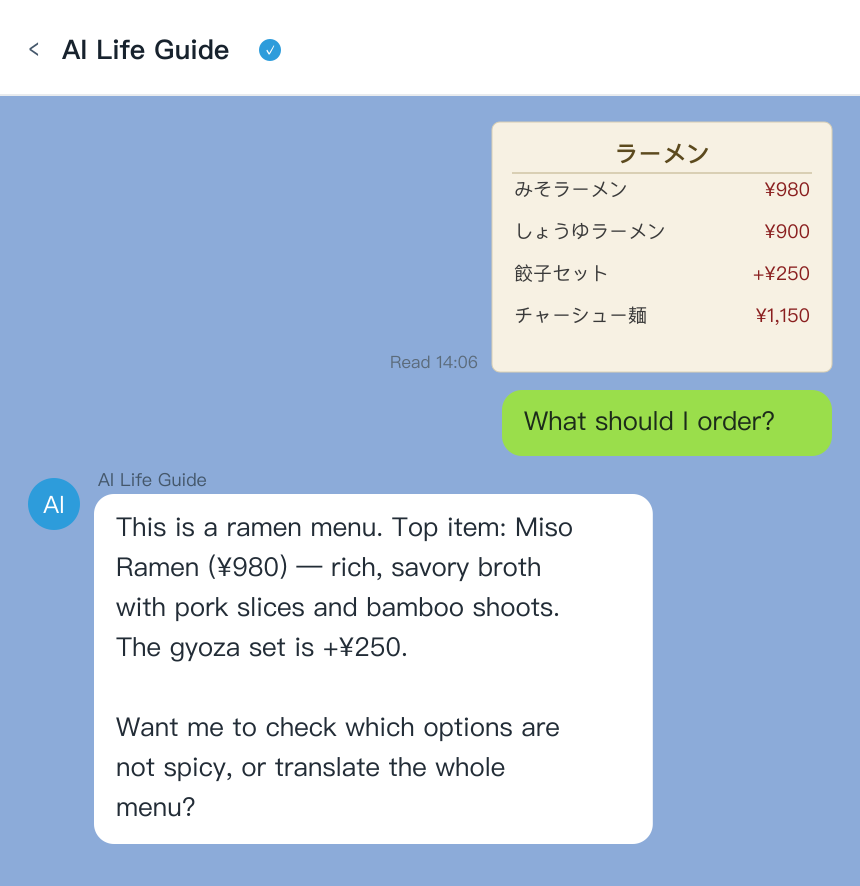
AI Life Guide demo: send a photo of a handwritten Japanese izakaya menu board in LINE and get an instant English explanation of each dish (simulated screenshot)
What actually works here is a tool that reads the whole photo for context rather than character-by-character. AI Life Guide looks at the board as a menu, not a string of symbols — so instead of returning a broken literal fragment for a smudged specials board, it can tell you it's looking at a fish special, describe roughly what kind of dish it is, and flag where it's uncertain. You can then ask a follow-up — "is this a whole fish or a fillet," "is this cooked or raw" — the way you would with a bilingual friend standing next to you, which a one-shot OCR scan simply can't do.
What Google Translate gets wrong on menus
Google Translate's camera mode is a genuinely useful free tool, and it's worth having installed as a backup. But it's built to map characters to words, not to understand what a dish is — and on menus, that gap shows up constantly.
The classic failure mode is the overly literal compound translation: Japanese dish names are often built from several kanji stacked together, and a word-by-word translation can spit out something like "burnt soy oil noodle child" for a dish that's really just a specific kind of seasoned ramen. It's not that the tool is broken — it's doing exactly what character-level translation does, which is map symbols to their closest individual meanings without knowing the dish exists as a named thing. That's the kind of output you should expect from any tool that translates literally rather than explains: technically not wrong, practically not useful for deciding what to order.
- Menu items are frequently compound words or regional dish names that don't translate cleanly one piece at a time.
- Handwritten or low-contrast text (chalk on a dark board, faded ink) increases misreads before translation even starts.
- The tool has no way to tell you whether a dish is spicy, contains shellfish, or is a small snack versus a full meal — it translates the label, not the food.
None of this means skip Google Translate — it's free, it's offline-capable with a downloaded language pack, and it's a fine first pass. It means treat its menu output as a rough sketch, not a final answer, especially for anything handwritten or unfamiliar.
The workflow that actually works
The most reliable approach on the ground splits the job between two tools instead of asking one to do everything.
- Google Lens or Google Translate for signs and labels: these are honestly fine for short, printed text where a literal translation is enough — a station name, a warning sign, a product name on packaging.
- AI Life Guide for menus and choosing what to order: this is where explaining beats translating — you need to know what a dish is, not just what the characters say, and you need to be able to ask a follow-up question in the same conversation.
- A $1.49 day pass as trip insurance for your stomach: on a day with several unfamiliar meals — a food-market crawl, an izakaya-hopping night — unlimited messages for 24 hours removes any hesitation about asking one more question before you order.
- Free 5 messages a day to try tonight: no signup friction beyond adding a LINE friend — photograph your dinner menu tonight and see what it tells you before committing to a paid tier.
Standing in front of a menu you can't read? Add AI Life Guide on LINE (free) and photograph it before you order.
Google Lens vs Papago vs AI Life Guide
- Tool: Google Lens | Reads signs: Yes | Reads menus: Literal only | Explains the dish: No | Follow-up questions: No | Price: Free
- Tool: Papago | Reads signs: Yes | Reads menus: Literal, strong for Korean | Explains the dish: No | Follow-up questions: No | Price: Free
- Tool: AI Life Guide | Reads signs: Yes | Reads menus: Explains, not just translates | Explains the dish: Yes | Follow-up questions: Yes | Price: Free 5/day, $3.99/mo, $34.99/yr, $1.49 day pass
FAQ
Q: How do I read a Japanese menu without knowing any Japanese?
A: Start with the roughly 15-character vocabulary list above — 定食, 丼, 麺, 焼き and similar recur on nearly every menu and tell you a dish's shape at a glance. For anything beyond that, photograph the menu and ask AI Life Guide on LINE what a specific dish is, not just what the characters say; it'll explain the dish and take follow-up questions the way a bilingual friend would.
Q: Do ramen ticket machines take cards?
A: Honestly, it varies. Many ticket machines, especially at older or smaller shops, are still cash-only. IC transit cards like Suica and Pasmo are accepted at a growing number of machines, and straight credit-card acceptance is increasing but still not universal. Carry cash as your default assumption and treat card or IC acceptance as a bonus, not a guarantee.
Q: Why does Google Translate fail on menus?
A: It translates characters to their closest word-for-word meaning rather than recognizing a dish as a named thing, so compound Japanese dish names can come out as an odd literal string instead of a real dish name. Handwritten or low-contrast text — common on izakaya boards — also increases misreads before translation even starts. It's a useful free first pass, not a reliable final answer for menus.
Q: What is the top-left button on a ticket machine?
A: On many ramen and gyudon ticket machines, the upper-left position is used for the house special or best-selling item, as a way of pointing new or unsure customers toward a safe order. It's a common pattern, not a universal rule — when in doubt, photograph the full machine and ask before you queue.
Q: Is there an app that explains dishes instead of just translating words?
A: Yes — that's the specific gap AI Life Guide is built for. Photograph a menu, a ticket machine, or a handwritten board in LINE, and it explains what a dish actually is in plain English, then answers follow-up questions like "is this spicy" or "does this have shellfish." It's free for 5 messages a day, with $3.99/month, $34.99/year, or a $1.49 day pass for heavier use.
Bottom line
Ticket machines, handwritten boards, and plain kanji lists all look like the same problem — text you can't read — but they fail differently, and no single tool handles all three well. Learn the recurring vocabulary, photograph the machine before you queue, and for anything handwritten or unfamiliar, use a tool built to explain a dish rather than one built to translate its label literally.
Add AI Life Guide before your next meal in Japan — free on LINE, and ask about tonight's menu before you sit down.
Further reading
- Best Japan Travel Translation Apps 2026: 6 Tools Tested for Menus, Signs & Pharmacies
- 10 Apps to Download Before Your Japan Trip (2026) — And the One Hiding Inside LINE
- Menu Translation Apps for Asia 2026: Order Confidently in Japan, Korea, Thailand & Taiwan
- Vegetarian, halal, or allergic in Japan: check what's really in your food
- How to book a restaurant in Japan without speaking Japanese
- How ordering actually works in Japan: ticket machines, call buttons, and QR menus
Sources
- Official app/tourism documentation, 2025-2026
- Hands-on travel testing, 2026