Is LINE Worth Downloading for a Japan Trip? 6 Things Tourists Can Actually Use It For (2026)
An honest answer to a question every Japan-bound traveler eventually asks: LINE is the country's default messenger, but is it actually worth installing before you go — and what would you use it for?

**Quick summary — 3-minute read**
• Short answer: yes, if you'll do any of the 6 things below — contact a small business, join a restaurant queue, chase a coupon, keep in touch with someone you meet, translate text on the fly, or use an AI tool that explains menus and signs instead of just word-mapping them.
• LINE is Japan's default messenger the way iMessage is default on an iPhone in the US, or WhatsApp is default across much of Europe — a lot of small businesses only list a LINE QR code, not an email address or phone number.
• You genuinely don't need LINE for maps, trains, or payments — Japan's navigation and payment apps handle those better on their own.
• The single strongest reason to install it: AI Life Guide, an AI camera built into LINE that explains what a menu, sign, or label actually says instead of just translating the words on it.
• Setup takes about 5 minutes and doesn't require a Japanese phone number — your home-country number works fine for signup.
If you've spent any time researching a Japan trip, you've probably run into some version of the advice "download LINE before you go." It's Japan's default messaging app in roughly the way iMessage is the default on an iPhone in the US, or WhatsApp is the default across much of Europe and Latin America — nearly everyone already has it, so nobody bothers listing an alternative. Ryokans put a LINE QR code on the booking confirmation. Restaurants tape a LINE sticker to the door. Tour guides message the meeting point instead of emailing it.
That advice is usually correct, but it's rarely explained well. Most "download LINE" posts just repeat the instruction without saying what a tourist would actually use it for once it's installed — so this piece answers the real question: what can you do with LINE in Japan, is any of it worth the download, and — just as important — what doesn't LINE help with, so you're not carrying an app you never open.
1. Contacting your ryokan, guesthouse, or tour operator
A meaningful number of independent ryokans, small guesthouses, and boutique tour operators in Japan run their guest communication almost entirely through LINE rather than email. It's not that they've rejected email — it's that LINE is where they already spend their day, so replies come faster there than anywhere else. Booking confirmations from smaller properties frequently include a LINE QR code with a line something like "add us for check-in details," and messages sent that way tend to get answered within the hour rather than sitting in an inbox for a day or two.
If your itinerary includes anything beyond large international hotel chains — a family-run ryokan, a countryside guesthouse, a small-group walking tour — there's a real chance the fastest way to reach them, and sometimes the only way, is a LINE message.
2. Restaurant queue and reservation systems
Waitlists at popular restaurants in Japan increasingly run through a LINE-based queue system rather than a paper sign-up sheet or a phone call. You scan a QR code at the entrance, add the restaurant as a LINE friend or open a mini-app inside LINE, and get a message when your table is close — freeing you to wander the neighborhood instead of standing by the door. Some restaurants also use LINE for reservation confirmations and reminders, sending the details as a chat message rather than an email you might not check while you're out.
None of this is universal — plenty of restaurants still run a walk-up line the old-fashioned way — but at busier spots in cities like Tokyo and Osaka, a LINE-based queue is common enough that having the app installed saves real waiting time.
3. Official accounts for coupons and deals
Department stores, drugstore chains, and shopping malls commonly run LINE Official Accounts that you can add as a "friend" the same way you'd follow a brand on social media. Once added, these accounts periodically send discount coupons, seasonal sale notices, or point-card-style perks redeemable in-store. The specific offers vary by store, season, and location — there's no universal deal to expect — but the mechanism itself is widespread enough that travelers doing any real shopping in Japan will run into a QR code inviting them to add an account for a coupon at checkout.
4. Keeping in touch with locals you meet
If you make a friend on the trip — someone from a hostel, a tour group, a bar — LINE is very likely how they'll want to stay in touch. Exchanging a LINE ID or QR code is the standard move in Japan the way swapping Instagram handles or phone numbers might be elsewhere. Showing up with the app already installed and your QR code ready to scan is a small thing, but it removes an awkward "oh, I don't have that" moment at exactly the point where you're trying to make a connection.
5. LINE's built-in text translation on photos
LINE's own translation features can help in a pinch: chat messages can be auto-translated, and several translation-focused Official Accounts and mini-apps built on the LINE platform let you send a photo and get the text extracted and translated. It's a genuinely useful fallback for short, printed text — a sign, a label, a simple notice.
Worth being honest about the limits, though: this kind of translation is literal, word-for-word text conversion, not an explanation. It reads characters and maps them to their closest equivalent in English, the same way any OCR-based translator does. It won't tell you whether a warning sign applies to you, whether a dish is spicy, or what a confusing instruction actually means in context — it just gives you the words.
6. AI Life Guide — the strongest reason to have LINE at all
This is the use case that tips LINE from "maybe useful" to "worth installing before you land." AI Life Guide is an AI camera assistant that lives inside LINE — you photograph a menu, a sign, or a label, and instead of a literal word-for-word translation, it explains what you're actually looking at in plain English. Confusing izakaya menu board? It tells you what the dish is, not just what the characters say. Warning sign at a shrine or onsen? It explains what it means and why it's there. And because it's a conversation, not a one-shot scan, you can ask a follow-up question — "is this spicy," "does this apply to tourists," "which button is the popular one" — the way you would with a bilingual friend standing next to you.
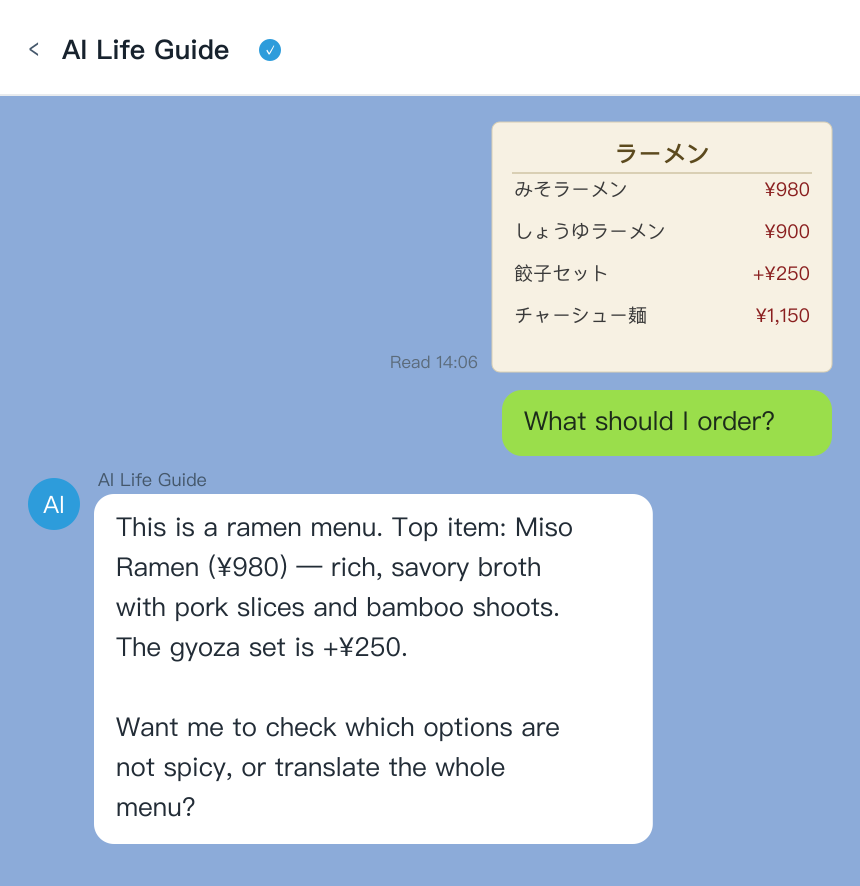
AI Life Guide demo: send a photo of a Japanese menu in LINE and get an instant plain-English explanation of each dish, plus a follow-up question (simulated screenshot)
That distinction — explaining versus translating — is the actual gap most camera-translation tools leave open, and it's the reason installing LINE for this one feature alone is defensible even if you never use any of the other five things on this list.
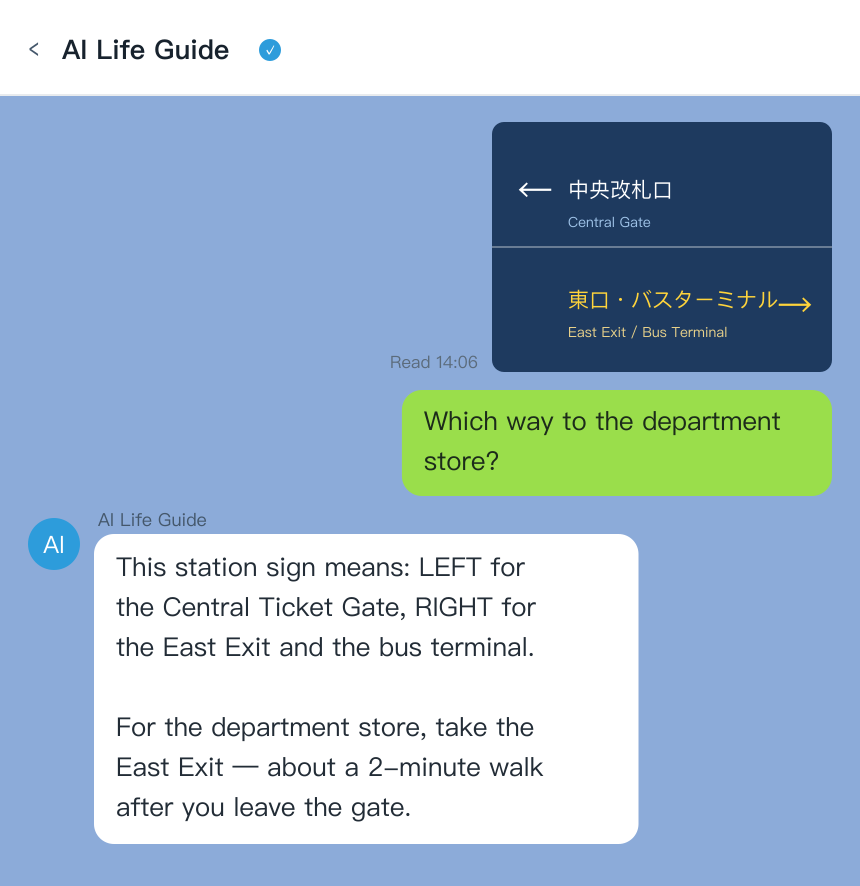
AI Life Guide demo: send a photo of a Japanese sign in LINE and get a plain-English explanation of what it means, not just a literal word translation (simulated screenshot)
What LINE is not needed for
To keep this honest: LINE is not a maps app, not a transit app, and not a payment app, and you shouldn't expect it to replace the tools that actually do those jobs well.
- Maps and directions: Google Maps or Apple Maps handle Japan's transit routing, walking directions, and station exits far better than anything inside LINE — there's no reason to look for that functionality here.
- Trains and transit passes: IC cards (Suica, Pasmo) and dedicated transit apps are what you actually tap and scan at the gate. LINE plays no role in that system.
- Payments: Japan's tourist-facing payment landscape runs on IC cards, credit cards, and cash, plus QR payment apps built specifically for that purpose. LINE Pay exists and is popular with residents, but it's not the tool a short-term visitor typically needs to set up.
If your trip is entirely large hotels, guided tours booked through international platforms, and restaurants with English menus, you might genuinely never open LINE. That's a fair outcome — the app earns its place through the specific situations above, not by default.
Setup in 5 minutes
Installing LINE and getting it ready before your flight takes about as long as it sounds.
- Download LINE from the App Store or Google Play and open it.
- Sign up with your existing phone number — your home-country number works fine, and you don't need a Japanese SIM or a local number to create an account.
- Verify with the code sent by SMS, then set a display name and profile photo (optional, but it makes you easier to add as a friend).
- Find your QR code under your profile — this is what you'll show a ryokan host, a new friend, or a restaurant to be added quickly.
- Add AI Life Guide as a friend so it's ready to go the moment you land, rather than fumbling with app setup at the airport.
A note on region settings: LINE's sign-up flow and available features can vary slightly by the country your account is registered in, so if something looks different from a screenshot you've seen online, it's likely just a regional variation rather than something broken — the core messaging and Official Account features described above work the same way for visiting tourists.
Set up LINE before you land, then add AI Life Guide on LINE (free) so it's ready the moment you hit your first confusing menu — a $1.49 day pass covers a full day of asking questions.
The 6 reasons, at a glance
- Need: Contacting a small ryokan/guesthouse/tour operator | Without LINE: Email often unanswered for a day or more | With LINE: Fast replies, matches local norm | Cost: Free
- Need: Restaurant queues & coupons | Without LINE: Miss digital waitlists and Official Account offers | With LINE: Join queues, receive store coupons | Cost: Free
- Need: Menu, sign & label explanations | Without LINE: Guess, or juggle a separate translation app | With LINE: AI Life Guide explains, not just translates, with follow-up questions | Cost: Free 5/day, $3.99/mo, $34.99/yr, $1.49 day pass
FAQ
Q: Do Japanese businesses really use LINE?
A: Yes, widely — LINE is Japan's dominant messaging app, and a large share of small businesses, from ryokans to restaurants to local tour operators, list a LINE QR code as their primary or only way to reach them. Larger international chains are more likely to still rely on email and phone.
Q: Can I use LINE just for translation?
A: You can — LINE's own translation features and translation-focused Official Accounts handle literal, word-for-word text on photos and messages reasonably well. If you want a tool that explains what a menu or sign actually means rather than just converting the words, that's the specific job AI Life Guide does inside the same app.
Q: Is LINE free?
A: Yes, the LINE app itself is free to download and use for messaging, Official Accounts, and its built-in translation features. AI Life Guide, the AI assistant inside LINE covered in this article, is also free for 5 messages a day, with paid tiers at $3.99/month, $34.99/year, or a $1.49 day pass for heavier use.
Q: Do I need a Japanese phone number for LINE?
A: No — you can sign up for LINE with your home-country phone number and don't need a Japanese SIM card or local number to create an account or use it as a visitor. Verification is done by SMS to whatever number you register.
Q: What's the difference between LINE's translator and AI Life Guide?
A: LINE's built-in translation features and translation Official Accounts do literal, word-for-word conversion — useful for short printed text, but they won't tell you what a dish actually is or why a sign matters. AI Life Guide reads a whole photo for context and explains it in plain English, then takes follow-up questions in the same conversation, which a one-shot literal translation can't do.
Bottom line
LINE isn't essential for every visitor to Japan, but it stops being optional the moment your trip includes a small ryokan, a popular restaurant with a digital queue, a local you want to stay in touch with, or — the strongest case of all — a menu, sign, or label you can't read. That last one is what AI Life Guide is built for, and it's free to try before you decide whether the rest of LINE's features are worth your attention too.
Landing in Japan soon? Add AI Life Guide on LINE (free) before your first meal, and see what it explains that a translation app wouldn't.
Further reading
- 10 Apps to Download Before Your Japan Trip (2026) — And the One Hiding Inside LINE
- How to Read a Japanese Menu in 2026: Ticket Machines, Handwritten Boards, and What Google Translate Gets Wrong
- Best Japan Travel Translation Apps 2026: 6 Tools Tested for Menus, Signs & Pharmacies
- Traveling Taiwan Without Reading Chinese (2026)
- ChatGPT vs Google Lens vs AI Life Guide: an honest comparison
Sources
- Official app/tourism documentation, 2025-2026
- Hands-on travel testing, 2026