Using ChatGPT as a Travel Translator in Japan (2026): What Works, What Doesn't
An honest comparison of ChatGPT, Google Translate/Lens, and AI Life Guide for reading menus, signs, and labels in Japan — including where each one genuinely wins.
**Quick summary — 3-minute read**
• ChatGPT can genuinely photograph a menu and hold a real conversation about it — that's not a weak option, and plenty of travelers use it well.
• What trips people up in practice: needing to know how to prompt it, results varying with phrasing, an app install plus account, and no memory of your dietary restrictions unless you repeat them every time.
• Google Translate/Lens is excellent at literal text translation — 75% of travelers already use a translation app — but it identifies what it sees without always understanding the context: it won't structure a menu, convert prices, or flag allergens.
• AI Life Guide gives zero-prompt structured output and remembers dietary restrictions inside LINE — but LINE has low reach in the US, so it's a genuine extra install for most Western readers, and it isn't a medical or legal authority either.
• This isn't about which tool is "best" — it's about which one fits a given moment, and the honest answer is often "more than one."
The real competition for a dedicated travel-translation tool in 2026 isn't another translation app — it's "just open ChatGPT and photograph the menu." That's a genuinely strong option for a lot of travelers, and pretending otherwise would be dishonest. This is an honest, three-way comparison — ChatGPT, Google Translate/Lens, and AI Life Guide — written to be useful even to someone who ends up choosing ChatGPT for their trip.
Each tool solves a real but different slice of the "I can't read this" problem in Japan, and none of them solves all of it. The goal here is to be specific about what each one is actually good at, where each one trips people up in practice, and when it's worth reaching for more than one.
What ChatGPT genuinely does well
ChatGPT's photo understanding is real, not a gimmick — point the camera at a menu, a sign, or a label, and it can describe what's there, translate it, and hold a genuine follow-up conversation: "is this spicy," "what's a good vegetarian option here," "what does this specific dish involve." That conversational flexibility is a real strength no single-purpose translation tool matches — you can ask it anything, in any order, and it adapts. Voice mode adds a hands-free layer that works well for quick back-and-forth without typing, useful when you're standing at a counter trying to move quickly.
For a traveler comfortable typing or talking to an AI assistant and willing to phrase a specific question, ChatGPT genuinely can replace a lot of what a dedicated tool offers — this isn't a strawman comparison, and readers who go this route for their whole trip aren't making a mistake.
What trips people up with ChatGPT in practice
The gap is less about capability and more about friction and consistency. ChatGPT's usefulness depends meaningfully on how you prompt it — a vague "what is this" gets a vaguer answer than "structure this menu into dish name, price, and whether it contains shellfish," and most travelers, mid-meal and hungry, aren't going to type a careful structured prompt every time. Results genuinely vary with phrasing, which means the same photo can get a thorough, useful answer from one traveler and a shallow one from another, purely based on how the question was asked.
There's also the practical overhead: an app install, an account, and for full capability, sometimes a paid tier — not a huge barrier for most people, but not zero either. Connectivity and battery matter more than they might seem: a full conversational AI session uses more data and, on some setups, more battery than a quick single-purpose scan, which adds up over a long day of sightseeing on limited mobile data. And critically, ChatGPT has no persistent memory of your dietary restrictions or preferences across a conversation unless you tell it every single time — mention a shellfish allergy at breakfast, and it's gone by dinner unless you say it again.
Google Translate and Lens: excellent at literal translation
Google Translate and its camera mode, Lens, remain genuinely excellent at one specific thing: literal, word-for-word translation of printed text, fast, offline-capable in many cases, and free. This is exactly why 75% of travelers to Japan already use a translation app, according to Japan Tourism Agency survey data — it's a proven, trusted, default tool, and for straightforward text — a street sign, a simple product label, a basic phrase — it's often the fastest option available.
The limitation is specific and well-documented: Lens identifies what it sees but does not always understand the context. It will translate the words on a menu into English, but it won't structure that menu into organized dish names, prices, and categories the way a human reading it would mentally organize it. It won't convert yen prices into your home currency. It won't flag that a dish contains raw fish or alcohol unless the literal translated word makes that obvious. It's a translation tool, doing translation very well — not an understanding tool, and it was never designed to be one.
AI Life Guide, honestly
AI Life Guide is built specifically for the gap between literal translation and full conversational flexibility: point a camera at a menu, sign, or label inside LINE, and it returns structured output — organized, with relevant details like allergens or price flagged — without needing a carefully phrased prompt first. It also remembers dietary restrictions you've set once, applying them automatically to later photos without you repeating them every time, which directly answers the memory gap ChatGPT has by default. And it lives inside LINE, which for a traveler already using LINE for other reasons (or willing to install it) means no separate app just for this.
The honest costs matter just as much as the honest benefits. LINE's reach in the US and much of the West is low — roughly 3.15 million US users, about 12% messaging reach — nowhere close to the near-universal presence it has in Japan, Thailand, and Taiwan. For most Western readers, choosing AI Life Guide means installing an app that isn't already on their phone, which is a real ask that a ChatGPT-based approach doesn't require if they already have the app. It also needs an internet connection like every option here, and it is not a medical or legal authority — allergen and ingredient reads are a first screen, not a guarantee, the same honest limit that applies to any photo-reading tool including ChatGPT and Lens.
- Tool: ChatGPT | Best at: Flexible conversation, follow-up questions | Real cost: Needs good prompting; no persistent dietary memory by default
- Tool: Google Translate / Lens | Best at: Fast, literal text translation | Real cost: Doesn't structure, convert prices, or flag allergens
- Tool: AI Life Guide | Best at: Zero-prompt structured reads, remembers restrictions | Real cost: Extra app install for most Western travelers (LINE)
Decision table: use X when Y
None of these three is the single right answer for an entire trip — the useful question is which one fits a given moment.
- Use Google Translate/Lens when you just need to know what a specific word or short phrase says, fast, and don't need it organized or explained further.
- Use ChatGPT when you want to have a real back-and-forth about a dish, situation, or decision, and you're comfortable typing or talking through a specific question.
- Use AI Life Guide when you want a structured read without composing a prompt each time, or when a dietary restriction needs to carry across the whole trip without you repeating it at every meal.
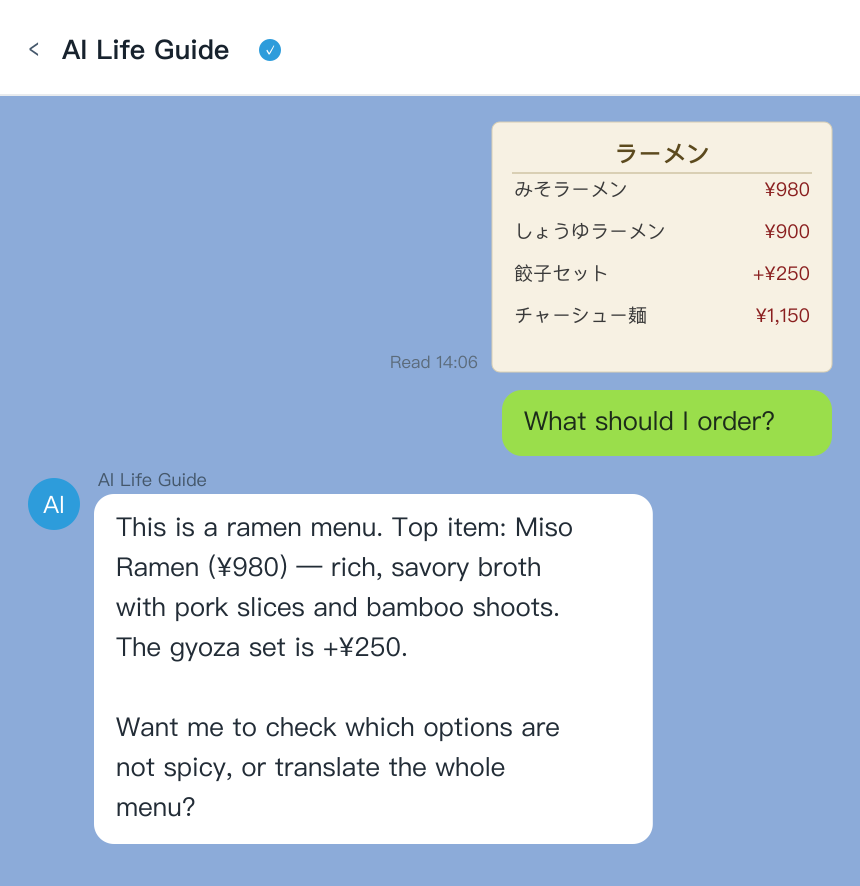
AI Life Guide demo: photograph a menu inside LINE for a structured, zero-prompt read of dish names, prices, and flagged allergens (simulated screenshot)
It's genuinely common, and reasonable, to carry more than one of these — Google Translate as a fast fallback for plain text, and either ChatGPT or AI Life Guide as the main tool depending on whether you'd rather type a question each time or have dietary restrictions remembered automatically. There's no honesty cost to admitting that overlap exists; the tools aren't mutually exclusive.
Want structured menu and label reads without typing a prompt each time? Add AI Life Guide on LINE (free) and try it alongside whatever else is already on your phone.
FAQ
Q: Is ChatGPT good enough as a travel translator?
A: For a lot of travelers, genuinely yes — its photo understanding and conversational flexibility are real strengths. The trade-offs are that results depend on how you phrase your question, it needs an app and account, and it doesn't remember your dietary restrictions across a conversation unless you repeat them each time.
Q: Can ChatGPT read a Japanese menu photo?
A: Yes — it can identify and translate the text on a menu photo and answer follow-up questions about specific dishes. It won't automatically structure the menu into an organized format or flag allergens unless you specifically ask it to, since it responds to how the question is phrased rather than producing a fixed structured output by default.
Q: Do I need internet for AI translation abroad?
A: Yes, for all three tools covered here — ChatGPT, Google Translate/Lens (in its full camera-translation mode), and AI Life Guide all require an internet connection to process a photo. Google Translate does offer limited offline language packs for basic text translation, but the more capable camera and context features across all three tools need connectivity.
Q: What's the difference between Google Lens and an AI assistant?
A: Lens is built specifically for literal translation — fast and accurate at converting printed text from one language to another, but it identifies what it sees without always understanding the context around it. An AI assistant like ChatGPT or AI Life Guide can go further, explaining what a dish is, structuring a menu, or flagging an allergen — because it's reasoning about the content, not just translating the words.
Q: Which is best for food allergies?
A: AI Life Guide's persistent dietary-restriction memory is built specifically for this — set an allergy once and it applies to every later photo without repeating it. ChatGPT can do this too if you restate the allergy in every conversation, and Google Lens doesn't flag allergens at all, only translating text. For a serious allergy, treat any of these as a first screen, not a guarantee, and confirm anything critical with staff directly.
Bottom line
ChatGPT is a real, capable option for reading menus and signs in Japan, not a strawman to compare against — the honest differences are around consistency, prompting effort, and memory, not raw capability. Google Translate/Lens remains the fastest tool for pure literal translation. AI Life Guide fits the gap between the two: structured, zero-prompt reads with persistent dietary memory, at the honest cost of an extra app install for most Western travelers. The right choice is whichever fits how you actually want to interact with a tool mid-trip — and carrying more than one is a completely reasonable answer.
Curious how a zero-prompt structured read compares on your own trip? Add AI Life Guide on LINE (free) and try it next to whatever else you're already using.
Further reading
- Best Japan Travel Translation Apps 2026: 6 Tools Tested for Menus, Signs & Pharmacies
- Is LINE Worth Downloading for a Japan Trip? 6 Things Tourists Can Actually Use It For (2026)
- Menu Translation Apps for Asia 2026: Order Confidently in Japan, Korea, Thailand & Taiwan
Sources
- Japan Tourism Agency traveler survey, 2024–2025
- LINE Corporation and third-party US messaging-reach estimates, 2025-2026
- Hands-on testing and traveler forum reports, 2026